

Ask Claude about your business.
Example questions: Which tasks are blocked right now? Summarize the Marlow Studio workspace. Which invoices are overdue? What’s on my calendar this week?
Connect Opsette to Claude, then ask about your clients, tasks, calendar and invoices in plain words, and have it add tasks, log your time and write docs.
Your Claude assistant is waiting to report.
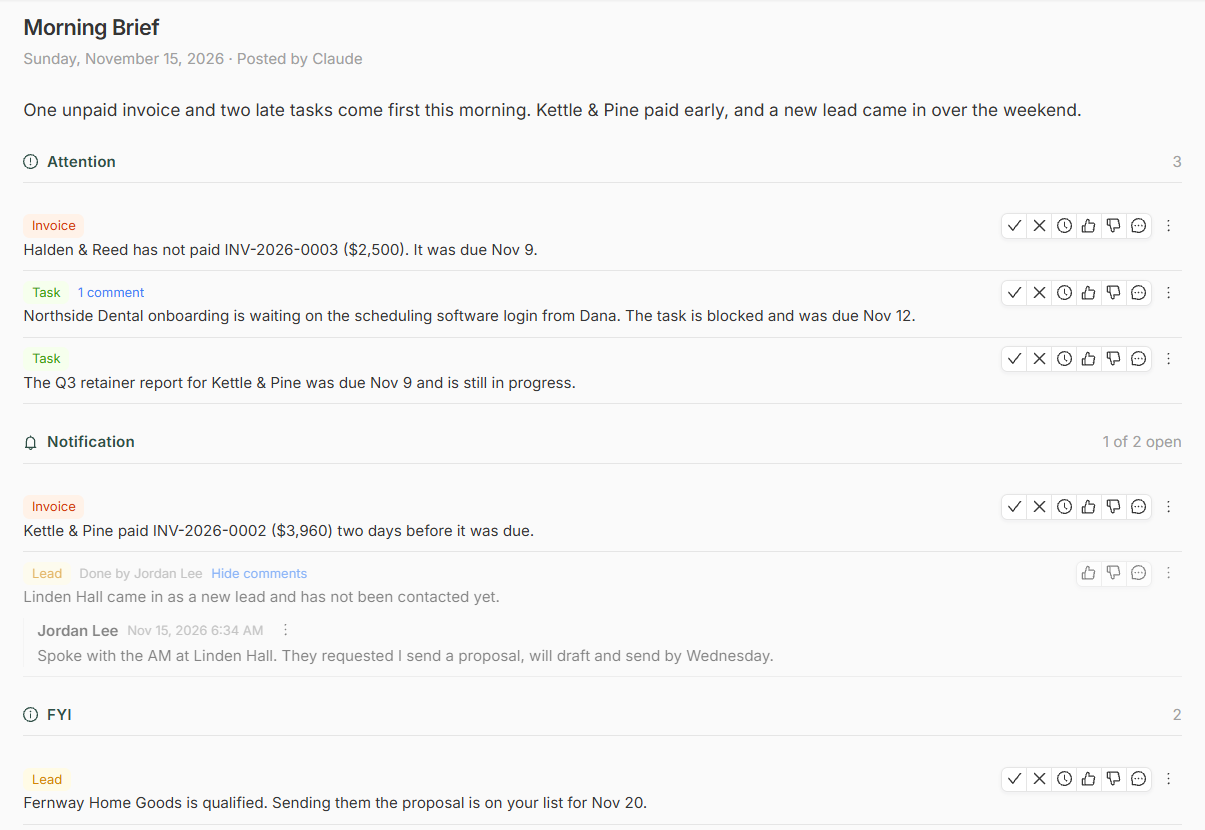
The Briefings page gives Claude top billing in Opsette. Decide what your business briefings cover and when they arrive, and set up a scheduled task in Claude to find out the latest across your business.
The results land on your Briefings page in three parts: Attention for what needs you, Notification for what happened, and FYI for what’s good to know. Mark what you’ve handled and snooze what can wait. The next briefing picks up from there.
How it works
Add Opsette as a connector in Claude.
Sign in to Opsette and click Allow access.
Ask Claude about your clients, tasks, calendar and invoices.
Create a scheduled task in Claude, and have briefings land in Opsette.
Agent activity
Opsette records every action the agent takes. Owners and admins can review it in Settings, under Integrations.
| Time | Action | Record | User | Result |
|---|---|---|---|---|
| 9:41 AM | List tasks | Jordan Lee | Completed | |
| 9:41 AM | Get client | Northside Dental | Jordan Lee | Completed |
| 9:44 AM | Get workspace | Marlow Studio, Ops review | Jordan Lee | Completed |
| 9:46 AM | Create task | Send the onboarding checklist | Jordan Lee | Completed |
| 10:02 AM | List leads | Jordan Lee | Completed |
What the agent can do
- Clients
“Who are my active clients?”
Finds clients, reads a client’s details and recent updates, and adds or changes a client.
List clients · Get client · Create client · Update client
- Leads
“Which leads came in this week?”
Finds leads, reads a lead’s notes and activity, and adds or changes a lead.
List leads · Get lead · Create lead · Update lead
- Tasks and time logs
“Log 2 to 3:30 PM today on the Northside Dental onboarding task.”
Finds tasks by workspace, client, assignee, status or due date, adds or changes a task, and logs your time on a task after you approve it.
List tasks · Get task · Create task · Update task · List time logs · Create time log · Update time log
- Workspaces
“Summarize the Marlow Studio workspace.”
Finds workspaces, reads a workspace’s updates and tasks, and adds or changes a workspace.
List workspaces · Get workspace · Create workspace · Update workspace
- Docs
“Write a kickoff agenda for Marlow Studio.”
Writes a new doc in Opsette for you to edit and share, and reads the docs you have.
Create doc · List docs · Read doc
- Calendar
“What’s on my calendar this week?”
Finds booked appointments and calendar events, adds or changes an event, and adds notes to a meeting.
List appointments · List calendar events · Get calendar event · Create calendar event · Update calendar event · Add meeting notes
- Invoices
“Which invoices are overdue?”
Finds quotes, invoices and proposals, and reads an invoice’s line items.
List invoices · Get invoice · List proposals
- Finances
“How did this month compare with last month?”
Reports income, expenses and net profit for a period, and what clients owe on sent invoices.
Get financial summary
- Messages
“What did Northside Dental last write?”
Finds the messages between you and your clients and leads, and records a call or email that happened outside Opsette. It never sends a message.
List client messages · Log client message
- Vendors and users
“Who are my contractors?”
Finds vendors and the people on your Opsette account, and adds or changes a vendor.
List vendors · Create vendor · Update vendor · List users
- Briefings
“Post this morning’s briefing.”
Posts a briefing to Opsette, and reads your responses to earlier briefings and the agent notes you wrote.
Post briefing · List briefings · List agent notes
Questions
Which Claude plans work?
Every plan, including Free, for asking questions in a chat. The Free plan allows one custom connector. Briefings need scheduled tasks, which are on Claude’s paid plans.
Can a briefing task change my records?
Only with the access you grant when you connect Claude. For a briefing task, View access plus Briefings is enough.
Who can connect it?
Owners and admins in Opsette. Each one connects with their own Opsette login.
How do I disconnect?
In Opsette, go to Settings, then Integrations. On the Claude card, click Manage access, then Disconnect. Access stops right away, for everyone in your organization.
Where are the full steps?
In the setup guide, with the access the agent asks for and troubleshooting.